The Eufy X10 pro omni and I got off on the wrong foot almost as soon as I took it out of the box. I’ll explain why in a moment, but first let’s take a look at the robot’s design.
Design
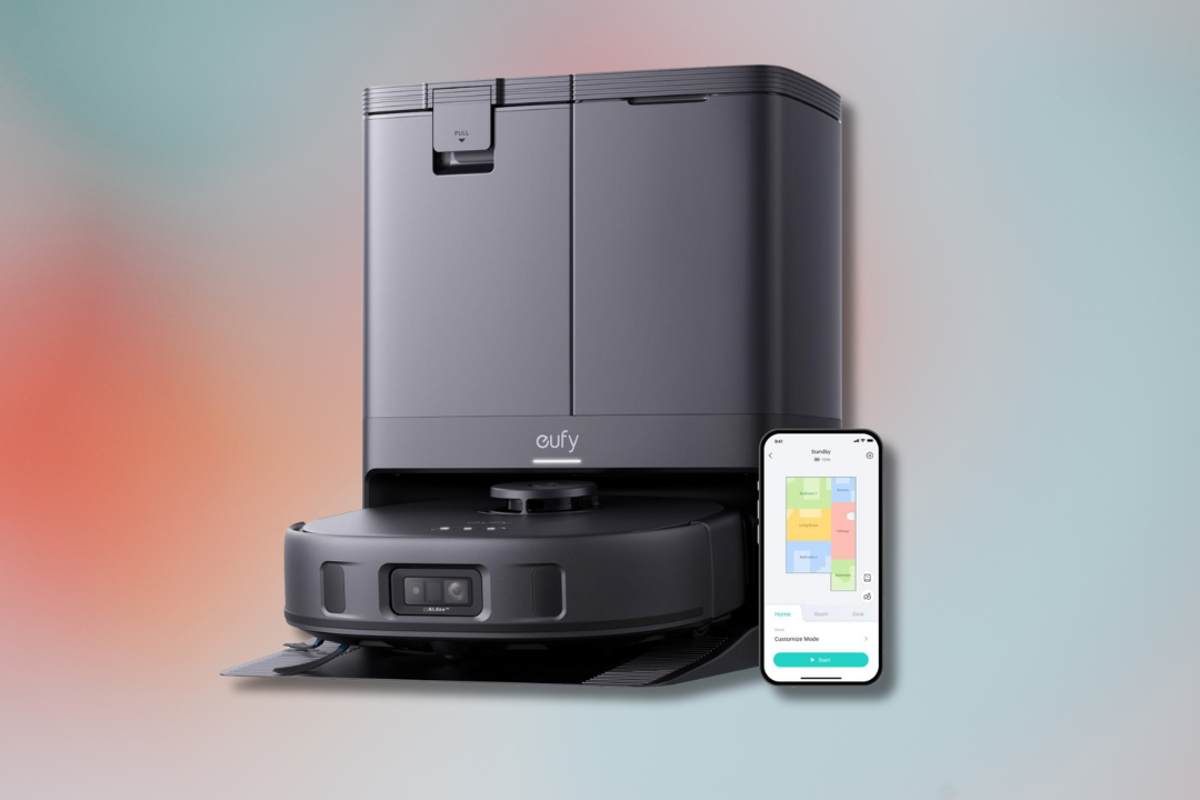
The Eufy X10 looks like most robot vacuum cleaners. Black and mostly round, but this one has a protruding circular knob that sticks out the top of the machine. This is the navigation LIDAR sensor that helps it get around the house. Called iPath LIDAR navigation, it even works in the dark (older roombas needs light to work, which is a pain if you want it to stay on top of the vacuuming while away from home).
There are three buttons on the top of the robot – a child lock button, a power button and a home button, which sends the robot back to its base. The Eufy omni station is pretty large (double the size of the j7+ clean base), as it houses two mopping water tanks – one for clean water and one for dirty water, which needs to be emptied regularly – as well as a dust bag. The robot vacuum empties all the dust and dirt it’s collected into this bag automatically.
Eufy Clean app
I’m used to the iRobot app, which holds your hand through every step of the process while setting up your roomba vacuum. In contrast, the Eufy Clean app is pretty confusing, and it has a frustrating learning curve, leaving you to figure out everything on your own.
Read more: The best cordless vacuum cleaners
While the initial setup is simple enough – you just choose the Eufy X10 pro omni from the list of devices and connect it to wifi – the app doesn’t tell you what you need to do next. The iRobot app walks you through an initial mapping run of your house, letting you set up individual rooms and room dividers, as well as teaching you how to use the vacuum cleaner, the Eufy app does none of this.
I was left to my own devices, with a home screen that displayed the X10, a button that said “Enter” and a heading that said “Scenarios”. Enter what, exactly? I had no idea. What’s a custom scenario? Don’t ask me. “Enter” seemed like the most obvious button to press, so I tapped it, and was brought to the page where you can start a clean. Why is the button called “Enter” and not “Clean”? It made very little sense.
Unsure what to do on this page, or when it would ask me to do a mapping run, I tapped the “Start” button. At that point, the X10 went whizzing around my house – no questions asked. It turns out there is no mapping run. As soon as you hit the start button for the first time, the Eufy just dashes around, vacuuming and mapping as it goes. There’s no tutorial telling you it’ll do this.
Read more: Tackle pet hair with these top vacuums
As it began pottering around my house, a map started to be built inside the app, with the X10 automatically detecting how many rooms I had, and even figuring out that the omni station was placed in a living room, and that it had mapped a bedroom and bathroom (something the older Roombas can’t do).
With the j7+, I have to set up my own rooms, and it can’t tell what kind of rooms are in the house – which is why I was so perplexed during the initial X10 setup process, as there didn’t seem to be anywhere for me to input that information.
Maybe I judged the X10 too harshly. Maybe it is smarter than I first assumed. Then, it finished cleaning my house, rolled onto my carpet and one of the mops on the bottom of the vacuum fell off. In a loud voice, the X10 told me to put the mop back on (which I did), then it tried to go back to its home station.
Read more: The best corded vacuum cleaners
A metre away from the clean base, the X10 then started whizzing around on the spot, bashing up against the sofa. Feeling exasperated, I placed it back onto the station and let it sit in the corner to think about its actions for the rest of the evening.
The next day, I decided to have another go, thoroughly unconvinced after my poor experience the night before. I began looking at the app in more detail – a task that took about an hour, thanks to the lack of in-app instructions.
With a better grasp of how the app worked and what settings it had, I decided to delete the map created the day before and start again from scratch, hoping that would fix the issues the X10 had when trying to find the omni station. Miraculously, that did the trick.
Performance
My opinion of the Eufy X10 pro omni changed almost immediately after learning how both the robot and the app functioned. With the knowledge gained from its flop run, I now knew it didn’t need to complete a solo mapping run to work, like the roomba.
So, I tapped “Start” again and let it do its job. It rushed around from room to room, vacuuming, mopping and mapping. When it had finished, it returned safely to its base, without spinning around on the spot in the totally wrong location or dropping one of its two mops.
Read more: Can this universal cleaner tackle it all?
Here’s how it all works. After filling the water tank up to the maximum water line and hitting the “Start” button in the app, the X10 leaves its base station to determine its location, positioning itself and then returning to the station to wash its two mops using the water in the tank. After it’s finished washing the mops, the Eufy leaves its station again and starts to clean. It scrubs the floor and vacuums simultaneously, and its remarkably effective. It doesn’t just swivel a mop pad around the floor, it properly scrubs the floorboards, while also vacuuming up any dirt or debris.
Eufy says the mops exert a 1kg downward pressure, with 180rpm, giving my floors a really good clean. It swivelled deep into a spilt cold brew coffee stain until it was gone. If the mops need more water, the X10 returns to the station to top up, then goes back out again on its run. It’s incredibly smart, and I felt a little ashamed for criticising it so much on the first day of unboxing.
Whenever it reaches carpet or a rug, the two mop pads lift up from the ground by 12mm, ensuring you don’t get any liquid on your carpeted floors. Once done, the X10 will return to its station, dry the mops (by way of a hand-dryer-like function) so there’s no damp smell, empty the bin into the 2.5l dust bag and start charging again.
Read more: The best Bluetooth speakers
It’s such a hands-off process, once you know how it works – you don’t have to do anything except empty the dirty water, refill the clean water tank every so often, and replace the dust bag every couple of months. There’s even a detangle comb on the vacuum’s roller brush, which removes hair automatically.
However, as with most robot vacuum cleaners, corners are a struggle. The X10 is too big to get into corners, so you’ll still need to take out your full-size vacuum and steam mop to clean tight spaces – although, the X10 is short enough to clean under my sofa.
It’s also a really quiet machine, compared with the j7+. And the omni station is maybe a touch quieter than the iRobot clean station when emptying dirt from the vacuum, but the omni also takes longer to empty and to dry the mops.
Read more: The refillable cleaning products to know
The Eufy X10 looks like it’s moving in a random pattern, with no strategic path to maximise its cleaning, but whatever path it took, it still managed to clean my home well. It didn’t get stuck on slippers, bags or cables, either. Eufy says the X10 has been trained to detect more than 100 different objects, and has an avoidance algorithm borrowed from the self-driving-car industry.
As for the vacuuming itself, Eufy says the X10 has 8,000Pa, which is the strongest suction out of the company’s robot vacuum cleaners. That’s also the highest suction of any robo vac we’ve reviewed, including the Dyson vis nav. But how did it perform in reality? So-so. I found the clean on hardwood floors was decent but it wasn’t fantastic on carpets, as I found debris and fluff still lingered. However, this all changed once I dove into the settings in the app.
Features
It’s time to talk about that dreaded app again. When you go to start a clean, you can choose to either clean your whole house or a specific room or zone. Once you’ve picked where you want to clean, you can customise the type of clean: fast, standard or deep.
Read more: The best air fryers
Originally, the Eufy X10 was set to standard by default, but when I switched the cleaning to deep, it was able to pick up every bit of dirt and debris on the carpet.
You can also adjust the suction power, of which there are four levels – quiet, standard, turbo and max. Again, it’s set to standard as default, but turbo and max give a much better vacuum. Quiet is the mode you’ll want to use at night, when people are sleeping, because the two higher modes are definitely noisier.
In the customisation settings, you can also choose to vacuum and mop (the default setting), only mop or only vacuum. It also lets you choose the amount of water used on the floors, from low to medium to high. Plus, there’s a neat edge-hugging mopping toggle. When you turn this on, the robot twists when it gets close to the walls, for a better clean.
Read more: This cleaning brand reduces plastic waste
While the Eufy is cleaning, you can also watch its path on the map in the app, seeing exactly what route it’s taking. The robo vac is also Alexa-enabled, and the verbal feedback from the vacuum is really loud and informative.
Earlier, I mentioned a “Scenarios” feature, which is actually really smart. Scenarios are basically like shortcuts on iOS. You can set up different scenarios for different types of cleans. Whether you want the X10 to target a specific zone after meals, for example, or run a deep clean with maximum suction power. Once you create a scenario, it’ll show up on the Eufy home screen, so you can start that scenario with just one tap.
After finally understanding how both the app and robot work, I was ready to admit it – the Eufy X10 pro omni is better than the iRobot roomba j7+, and I’m not sure I’ll ever go back to using the j7+ again.